🌐 NAT Gateway
- Allows private subnets to access the internet or AWS services
- Use cases:
- 📥 Download software updates from internet
- 🔗 Connect to AWS services (e.g., S3, DynamoDB)
- Provides one-way (outbound-only) internet access from private subnet
- Requires an Elastic IP (EIP) for outbound traffic
⚙️ Key Points
- NAT Gateway must be in a public subnet
- Public subnet must have a route to the internet (via Internet Gateway)
- Private subnet’s route table must point to the NAT Gateway for internet-bound traffic
- 🔒 Network ACLs (NACLs) still apply to NAT Gateway traffic
- 📌 Elastic IP ensures consistent public IP for outbound traffic
🔁 How Does NAT Work?
1️⃣ Private EC2 instance initiates a request (e.g., yum update) 2️⃣ Request is forwarded to the NAT Gateway (in public subnet) 3️⃣ NAT Gateway translates private IP → public IP, sends the request out 4️⃣ Internet response returns to NAT Gateway, which forwards it to the EC2 instance
NAT Gateway Architecture
| Single AZ Setup | Multi-AZ Setup |
|---|---|
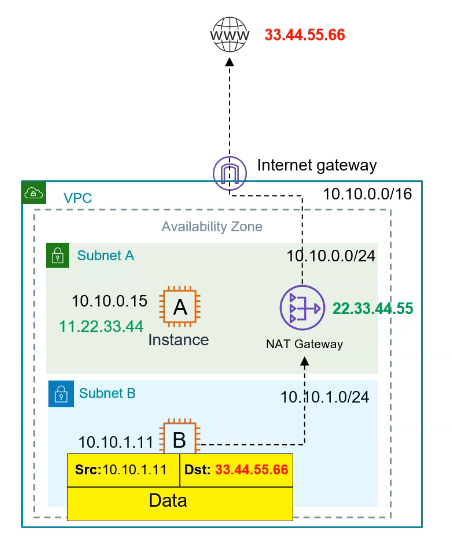 | 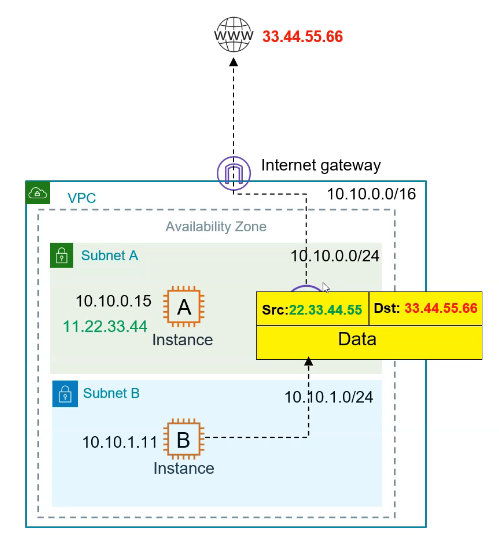 |
| If AZs goes downs then NAT goes down | Recommended for Production workloads |
|---|---|
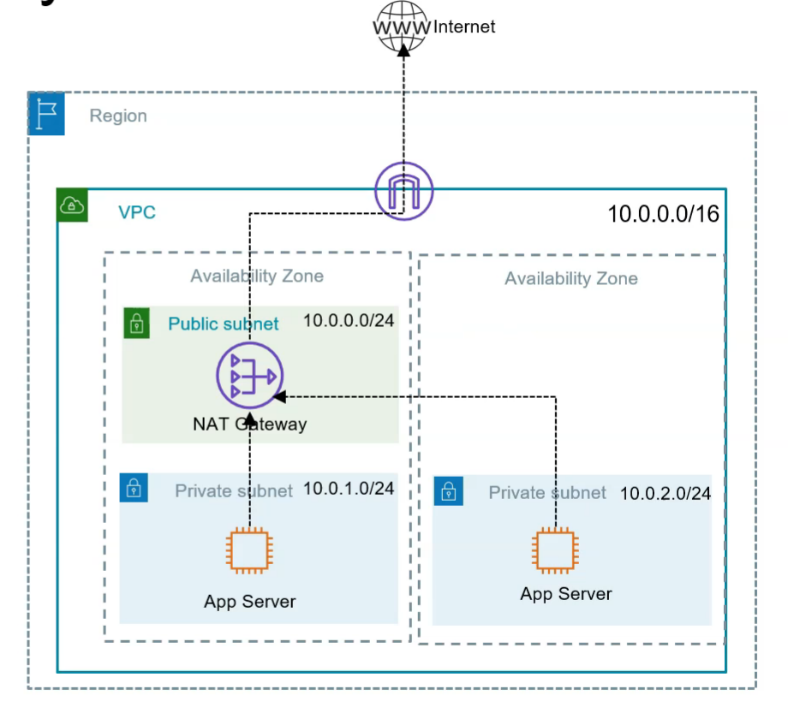 | Launch multiple NAT per AZs 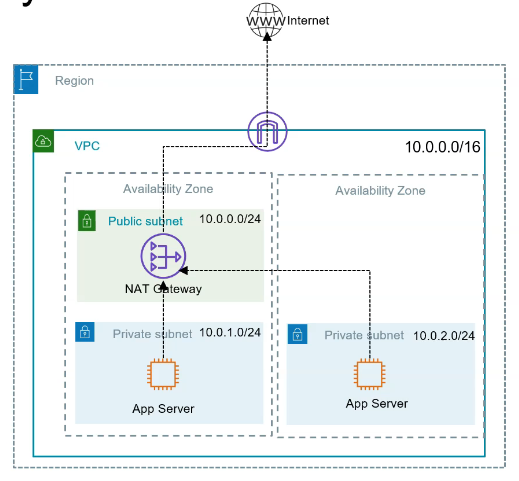 |
🧠 What is a NAT Instance?
A NAT Instance is just a regular EC2 instance that is manually configured to forward traffic from private instances to the internet — just like a NAT Gateway, but cheaper and more DIY.
🔁 How it works:
- You launch an EC2 instance in a public subnet
- You enable IP forwarding on it
- You update the route table of your private subnet to route internet traffic (0.0.0.0/0) through the private IP of the NAT instance
- The NAT instance then forwards that traffic to the internet using its Elastic IP
💸 Why use a NAT Instance?
- Cheaper than NAT Gateway
- You pay EC2 pricing (which can be as low as a few dollars/month if using t3.micro)
- No per-GB processing charges like with NAT Gateway