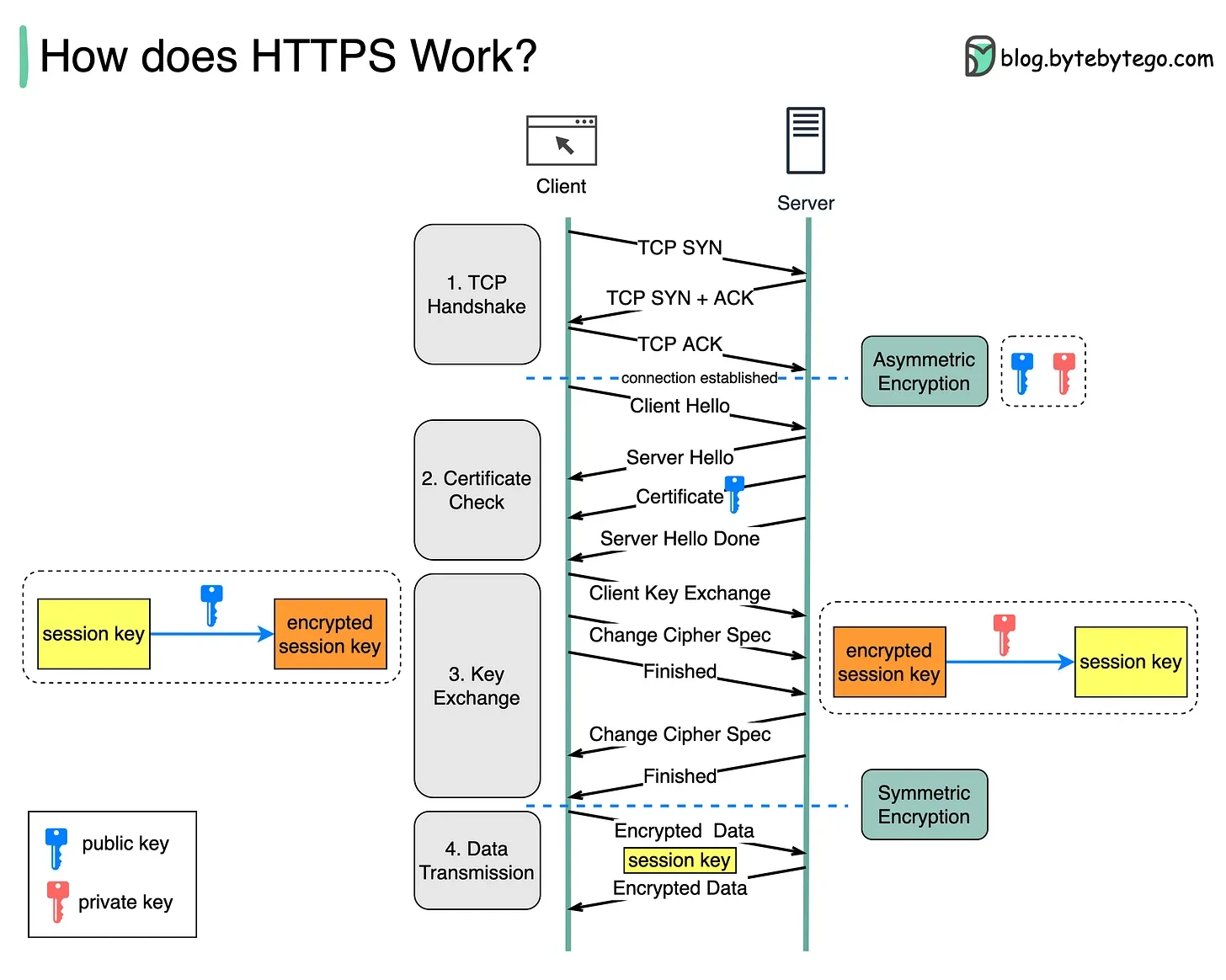
🌐 1️⃣ The Problem — Insecure Communication
- Communication over HTTP is plain text — easily readable by anyone on the network.
- A Man-in-the-Middle (MITM) attacker can intercept (or “sniff”) data.
- Example: A hacker between you and the server can read usernames, passwords, etc.
💡 Need: A way to secure data in transit so even if intercepted, it’s unreadable.
🔑 2️⃣ Attempt 1 — Symmetric Encryption
- One key is used for both encryption and decryption.
- Problem ❌: Both client and server need the same key, but sharing it securely over the network is impossible — a hacker can steal it during exchange.
📌 Conclusion: Good for speed, but not safe for exchanging the key itself.
🧩 3️⃣ Attempt 2 — Asymmetric Encryption (Public/Private Keys)
Used to safely exchange the symmetric key.
- Public Key → used to encrypt data
- Private Key → used to decrypt data
🔄 Handshake Steps:
- Server generates a Public and Private key pair.
- Server sends its Public Key to the client.
- Client generates a Session Key (symmetric key).
- Client encrypts this session key using the Server’s Public Key.
- Server decrypts it using its Private Key.
- ✅ Both now share the same secret session key.
- All further communication is encrypted symmetrically (faster).
⚠️ Still a risk: What if the hacker replaces the server’s Public Key during exchange?
🕵️ 4️⃣ The Proxy (MITM) Attack Problem
- A hacker can intercept and replace the server’s Public Key with their own.
- The client unknowingly encrypts data with the hacker’s Public Key.
- Hacker decrypts and reads data before forwarding it to the real server.
❗ Client has no way to confirm that the received Public Key truly belongs to the real server.
🪪 5️⃣ The Final Solution — SSL Certificates (Digital Proof of Identity)
SSL Certificates ensure the Public Key truly belongs to the intended domain.
🏢 Role of Certificate Authority (CA)
- Trusted organizations like Let’s Encrypt, DigiCert, GoDaddy, etc.
- They verify the domain owner and digitally sign the certificate.
📜 Certificate Creation:
- Server generates a Public and Private Key.
- Server sends a Certificate Signing Request (CSR) to the CA (includes domain + Public Key).
- CA verifies domain ownership.
- CA digitally signs the certificate with its own Private Key.
- Certificate contains:
- Domain Name
- Server’s Public Key
- Issuer details (CA)
- Validity period
- Digital signature
🧠 6️⃣ How Certificate Verification Works (During HTTPS Handshake)
-
Server sends its SSL Certificate + Public Key to the client.
-
Browser checks:
- Is the certificate issued by a trusted CA?
- Is the domain name valid and unexpired?
-
Browser gets the CA’s Public Key (already stored in its root trust store).
-
Browser uses it to verify the CA’s digital signature on the certificate.
-
If valid ✅:
- Confirms that the Public Key belongs to the real server.
- The client proceeds with secure key exchange.
-
If invalid ❌:
- Browser warns: “Your connection is not private.”
🧩 7️⃣ Summary of SSL Workflow
| Step | Purpose | Encryption Used |
|---|---|---|
| 1️⃣ | Verify server identity | Certificate (CA signature check) |
| 2️⃣ | Securely exchange session key | Asymmetric (Public/Private keys) |
| 3️⃣ | Encrypt actual data | Symmetric (Session key) |
💡 8️⃣ Additional Notes
- SSL certs include: Version, Serial No., Signature Algorithm, Validity.
- Fullchain.pem → includes entire certificate chain (server + CA).
- Self-signed certificates (like for localhost) work, but browsers show warnings as they aren’t issued by trusted CAs.
- Modern SSL = TLS (Transport Layer Security) — the successor to SSL.