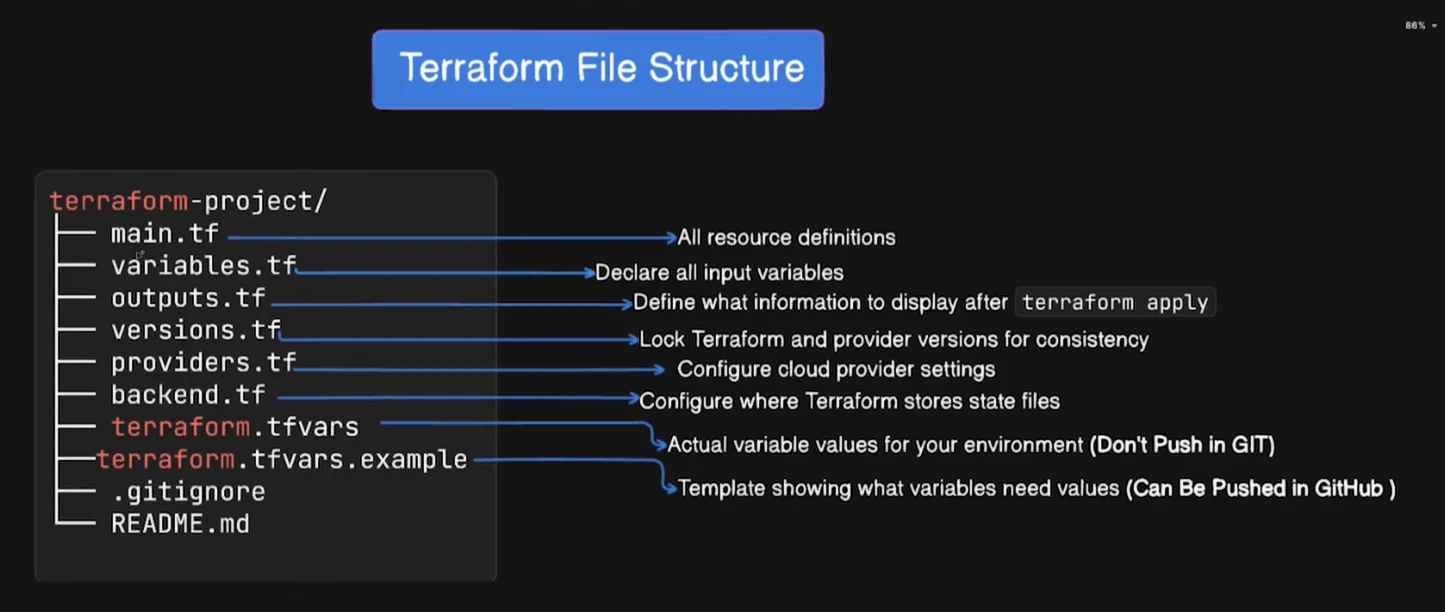
🟦 Summary Table
| File | Purpose | Commit to Git? |
|---|---|---|
| main.tf | Infra definition | ✔ Yes |
| variables.tf | Variables | ✔ Yes |
| outputs.tf | Outputs | ✔ Yes |
| terraform.tfvars | Variable values | ⚠️ Yes (only if no secrets) |
| .terraform/ | Providers/modules | ❌ No |
| .terraform.lock.hcl | Provider version lock registry.terraform.io | ✔ Yes |
| terraform.tfstate | Terraform’s “memory” of your infrastructure | ❌ No |
| terraform.tfstate.backup | Backup state | ❌ No |
1️⃣ main.tf
Your primary Terraform configuration file.
Contains:
- provider block
- resources
- modules
- data sources
This is the infrastructure blueprint.
2️⃣ variables.tf
Defines all input variables.
Example:
variable "region" {
  default = "us-east-1"
}
This makes your configuration reusable.
3️⃣ outputs.tf
Defines what Terraform outputs after apply.
Example:
output "lambda_arn" {
  value = aws_lambda_function.put.arn
}
Useful for:
- printing API URLs
- VPC IDs
- resource ARNs
4️⃣ terraform.tfvars (optional)
Used to provide values for variables.
Example:
region = "us-east-1"
lambda_runtime = "nodejs22.x"
✔ Commit to Git?
⚠️ ONLY IF it does NOT contain secrets
If it has credentials → ❌ DO NOT COMMIT
5️⃣ .terraform/ (hidden folder)
Created when you run:
terraform init
It contains:
- downloaded providers
- modules
- plugin binaries
Example structure:
.terraform/
  ├── providers/
  │     └── registry.terraform.io/
  │            └── hashicorp/aws/
  └── modules/
✔ Commit to Git?
NO ❌
Add .terraform/ to .gitignore.
6️⃣ .terraform.lock.hcl ← the one you asked about
This file locks provider versions so Terraform uses the exact same versions everywhere.
Prevents:
- accidental upgrades
- breaking changes
- incompatible provider mismatches
Example:
provider "registry.terraform.io/hashicorp/aws" {
  version = "6.13.0"
  hashes = [
    "h1:xxxx",
    "h1:yyyy"
  ]
}
✔ Commit to Git?
YES ✔
Everyone gets the same provider versions.
✔ Can you delete it?
Yes — Terraform will recreate it on next terraform init.
✔ Why did it appear during terraform plan?
Because running terraform init created it, and plan detects changes in the lockfile.
7️⃣ terraform.tfstate
This is the most critical file.
It stores:
- resource IDs
- ARNs
- metadata
- dependencies
- outputs
This file represents the real live infrastructure state.
❗ VERY IMPORTANT
- Never edit manually
- Never expose publicly
- Never commit
✔ Commit to Git?
NO ❌❌❌
Add to .gitignore.
8️⃣ terraform.tfstate.backup
Created automatically after each apply.
- Stores previous state
- Used for recovery if corruption occurs
✔ Commit to Git?
NO ❌
🟦 Additional Notes
Using a remote backend (S3)?
- Actual state moves to S3
- Locking handled by DynamoDB
- Local state file becomes only a reference
.terraform.lock.hcl always stays local
Because it is about provider dependency versions—not state.