1️⃣ What is Docker
📌 Problem Docker solves
Before Docker:
- Apps worked on my machine but failed elsewhere
- Dependency hell (Python versions, libraries, OS differences)
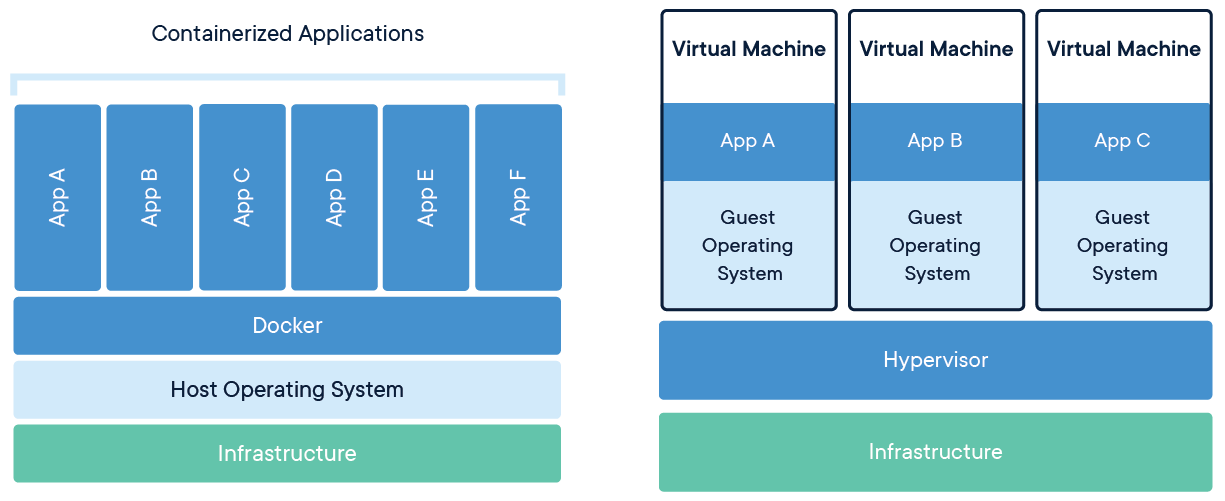
- Heavy Virtual Machines (slow, big)
✅ Docker solution
Docker packages your app + dependencies + environment into a container
Think of Docker container as:
App + Libraries + Runtime + Config
Runs same everywhere 🧠
2️⃣ Docker vs Virtual Machine (important)
| Feature | Docker | VM |
|---|---|---|
| Size | MBs | GBs |
| Boot time | Seconds | Minutes |
| OS | Shares host kernel | Full OS |
| Performance | Near-native | Slower |
| Isolation | Process-level | Hardware-level |
📌 Docker is lighter and faster
3️⃣ Core Docker concepts (must know)
🔹 Image
- Read-only template
- Built from
Dockerfile - Example:
python:3.11,nginx
🔹 Container
- Running instance of an image
- Image ➜ run ➜ container
🔹 Dockerfile
- Instructions to build an image
🔹 Docker Engine
- Background service that runs containers
🔹 Docker Hub
- Public image registry
4️⃣ Install Docker (quick)
- Windows / Mac: Docker Desktop
- Linux:
sudo apt install docker.ioVerify:
docker --version
docker ps
5️⃣ Your first Docker container (hands-on)
▶️ Run hello-world
docker run hello-worldWhat happens internally:
- Docker looks for image locally
- If missing → pulls from Docker Hub
- Creates container
- Runs it
- Exits
6️⃣ Run a real container (Nginx)
docker run -d -p 8080:80 nginx-d→ detached (background)-p 8080:80→ host:container port mapping
Open browser:
http://localhost:8080
7️⃣ Important Docker commands (daily use)
🧠 Containers
docker ps            # running containers
docker ps -a         # all containers
docker stop <id>
docker rm <id>
🧠 Images
docker images
docker pull python
docker rmi <image>
🧠 Logs & Exec
docker logs <container>
docker exec -it <container> bash
8️⃣ Dockerfile (heart of Docker)
Example: Python app
# Base image
FROM python:3.11-slim

# Set working directory
WORKDIR /app

# Copy files
COPY . .

# Install dependencies
RUN pip install -r requirements.txt

# Run app
CMD ["python", "app.py"]
Build image:
docker build -t myapp .Run:
docker run myapp9️⃣ Volumes (persist data)
Containers are ephemeral ⚠️
❌ Without volume
- Data lost when container stops
✅ With volume
docker run -v /host/data:/container/data myapp📌 Used for:
- Databases
- Logs
- Uploaded files
🔟 Environment variables
docker run -e DB_HOST=localhost -e DB_PORT=5432 myappOr inside Dockerfile:
ENV APP_ENV=production1️⃣1️⃣ Networking (simple)
- Containers in same network can talk by name
docker network create mynet
docker run --network mynet --name backend myapp
docker run --network mynet frontend
Access backend using:
http://backend:port
1️⃣2️⃣ Docker Compose (multi-container apps)
📌 Used when you have:
- App + DB + Cache
- Microservices
Example:
version: "3.8"

services:
  app:
    build: .
    ports:
      - "8000:8000"

  redis:
    image: redis
Run:
docker compose upStop:
docker compose down1️⃣3️⃣ Mistake to Avoid
- ❌ Using
latesttag - ❌ Copying everything before deps
- ❌ Hardcoding secrets
- ❌ Too many RUN layers
1️⃣4️⃣ Best Practice Example (Multi-stage Build)
# Base image (Alpine for lightweight build)
FROM node:16-alpine as builder

# Set working directory
WORKDIR /app

# Install dependencies separately for better caching
COPY package*.json ./
RUN npm install --production

# Copy the application code
COPY . .

# Run build step (if needed)
RUN npm run build

# Multi-stage build to keep final image lightweight
FROM node:16-alpine

# Set working directory
WORKDIR /app

# Copy only the built files and node_modules from the builder stage
COPY --from=builder /app/node_modules ./node_modules
COPY --from=builder /app/dist ./dist

# Set environment variables
ENV NODE_ENV=production \
    PORT=3000 \
    DB_HOST=localhost \
    DB_USER=admin

# Expose port
EXPOSE 3000

# Set non-root user for security
USER node

# Run the application
CMD ["node", "dist/server.js"]
📚 Pro Tips
- Always use minimal base images (like alpine) to keep the image lightweight
- Combine multiple RUN commands to reduce layers and optimize caching
- Setting non-root user (USER node) for better security
- Use
.dockerignorefile to exclude unnecessary files from build context. EX. .git node_modules pycache/ .env - Order Dockerfile instructions from least to most frequently changing for better caching ✅ (huge performance tip)
1️⃣5️⃣ CMD Vs Entrypoint
1️⃣ CMD (default command)
CMD defines:
- The default command
- Can be overridden at runtime
- EX.
FROM python:3.11-slim
CMD ["python", "app.py"]- Run:
docker run myapp - Executes:
python app.py - Override CMD:
docker run myapp python test.py - Executes:
python test.py
📌 CMD is soft default - Use CMD when: You want to provide a default command that can be easily overridden
2️⃣ ENTRYPOINT (fixed command)
ENTRYPOINT defines:
- The main executable
- Cannot be replaced easily
- Ex
FROM python:3.11-slim
ENTRYPOINT ["python", "app.py"]- Run:
docker run myapp - Executes:
python app.py - Override CMD:
docker run myapp python test.py - ❌ Result::
python app.py python test.py
📌 ENTRYPOINT is hard default - Use ENTRYPOINT when: You want to create a container that always runs a specific executable
3️⃣ CMD + ENTRYPOINT together (best pattern)
- Cannot be replaced easily
- Ex
FROM python:3.11-slim
ENTRYPOINT ["python"]
CMD ["app.py"]- How Docker resolves it:
ENTRYPOINT + CMD = python app.py - Override CMD only:
docker run myapp test.py - Final command:
python test.py
📌 This is the most powerful pattern